

You must have the appropriate permissions to view Roles and Permissions. Internal Chat (Conversations) must be enabled for your tenant High-level organizational grouping used to manage technical support, billing, and global settings for your NiCE CXone system. in order to see these permissions.
For more information, see Roles.
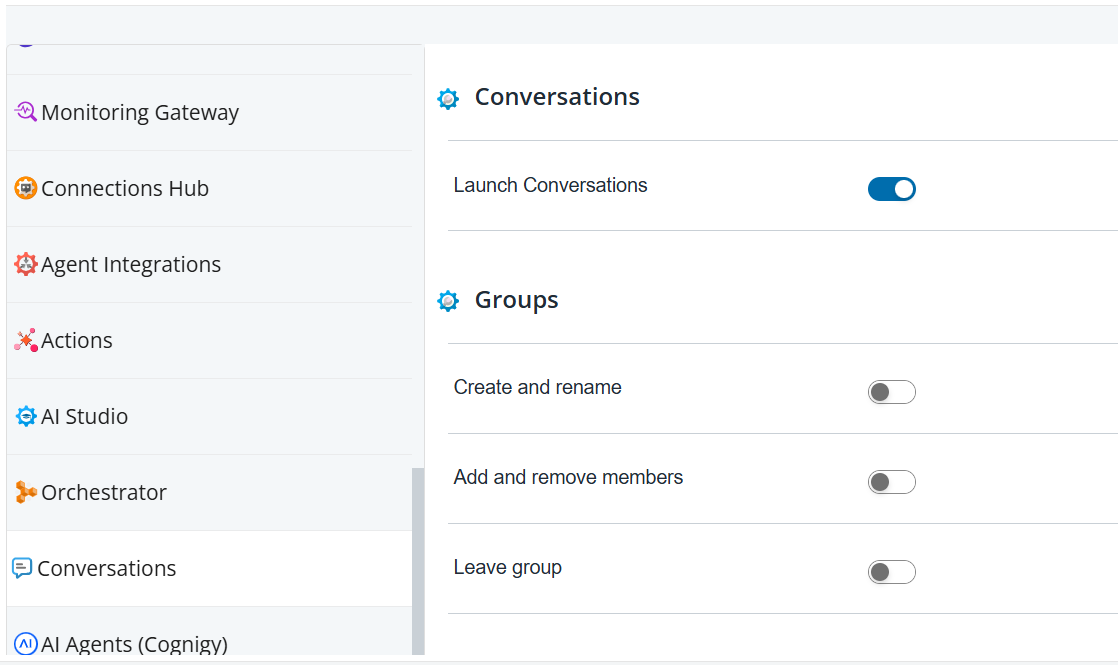
Internal Chat (Conversations)
Launch Internal Chat (Conversations)
Controls whether users can launch Internal Chat (Conversations)  from the app selector
  in NiCE CXone. Internal Chat (Conversations) allows NiCE CXone users to chat one-on-one and in groups.
Internal Chat (Conversations) requires a Digital Experience (DX) license. Users must have the Digital Engagement employee profile attribute to use Internal Chat (Conversations).
To allow agents Contact center employee who interacts directly with customers through inbound or outbound communication channels (voice, digital, or omnichannel). to access Internal Chat (Conversations) in NiCE CXone Agent Workspace (Agent) applications, enable it for the desktop profile for their role.
Groups
Create and Rename
You can turn this permission on or off. By turning this permission on, users can create and rename the groups. By default, this is set to OFF.
Add and Remove Members
You can turn this permission on or off. By turning this permission on, users can add and remove members to the group. By default, this is set to OFF.
Leave Group
You can turn this permission on or off. By enabling this permission, users can leave the group. By default, this is set to OFF.